Define the serial pattern in the Patterns tab of your control record. Patterns consist of the following pieces:
- Enumeration Pattern
- Chronology Pattern
- Publication Pattern
Enumeration pattern
For serial publications that rely on enumeration, i.e., academic journals, medical journals, or comic books, define those levels in the enumeration pattern.
Do not record enumeration for consumer magazines, newspapers, or trade journals.
- Use the gadget(s) to choose one or more levels of enumeration.
- If there is more than one level of enumeration, enter the number of issues that comprise that level in the Limit field.
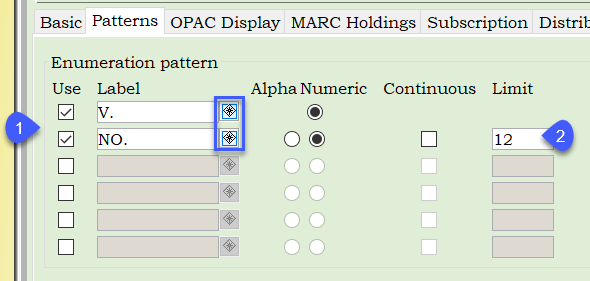
Check the Continuous box if issue numbers in the second level of enumeration do not restart at 1 when the first level of enumeration increments.
Chronology pattern
Choose a Chronology type to define the chronology pattern.

Call numbers must be entered in an exact format based on the selected Chronology type.
| Chronology Type | Definitions | Example | |
| BIMONTH | JAN/FEB, MAR/APR, MAY/JUN, JUL/AUG, SEP/OCT, NOV/DEC | MAR/APR 2021 | |
| BIMONTH2* | DEC/JAN, FEB/MAR, APR/MAY, JUN/JUL, AUG/SEP, OCT/NOV |
DEC 2020/JAN 2021 APR/MAY 2021 |
|
| DATE** | MMM DD, YYYY |
APR 7, 2020 APR 14, 2020 |
|
| MONTH | JAN, FEB, MAR, APR, MAY, JUN, JUL, AUG, SEP, OCT, NOV, DEC | APR 2020 | |
| NUMERATION | This publication uses enumeration labels only. | n/a | |
| SEASON*** |
WIN, SPR, SUM, FALL (Note WIN begins the cycle) |
WIN 2015 | |
| SEASON2 |
SPR, SUM, FALL, WIN (Note SPR begins the cycle) |
FALL 2020 | |
| SEASON3 |
JAN/MAR, APR/JUN, JUL/SEP, OCT/DEC (This is a three month season combination) |
APR/JUN 2020 | |
| YEAR | 4-digit year only | 2021 | |
| CUSTOM | Enter custom names, separated by commas – up to 200 characters may be entered | FEB/MAR/APR, JUN, JUL/AUG/SEP, OCT/NOV, DEC, JAN | |
| SPECIAL | Enter chronology in line with the publication's pattern followed by the major term the publisher used to describe the issue |
MAR 2021 HOLLYWOOD NOV 2021 ELECTION JUN 30, 2021 SPECIAL OCT 15, 2021 ESPECIAL |
|
|
*BIMONTH2 pattern uses the year for both December and January, as shown in one of the examples **When a day of the month is only one digit, only list the single digit. Do not add a zero to make it two digits. ***Note that FALL is spelled out fully while all other seasons have a 3-letter code |
|||
Chronology pattern with ISS. number and YEAR
For magazines that use chronology ISS. number and YEAR, such as: Bicycling, Runner’s World, and Cosmopolitan, libraries should manually edit the call numbers to reflect year first followed by issue number to display chronologically.
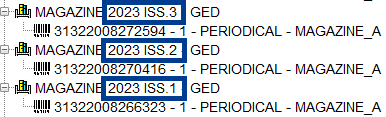
You can continue generating predictions; however, call numbers will need to be modified to reflect YEAR + ISSUE NUMBER.
Please remember:
- Do not “make up” information that does not appear on the source. For example, if the magazine has only the year and issue number DO NOT add month to the call number. This is confusing for patrons and libraries alike.
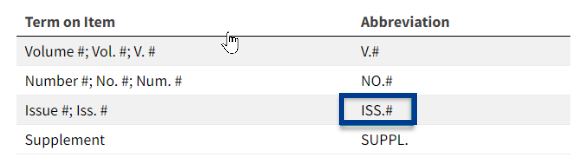
- The correct abbreviation must be used with no space between the abbreviation ISS. and the number. For example: ISS.7
-
When you edit call numbers, verify the correct placement of the |z:
PERIODICAL|z2023 ISS.3
Publication pattern
Use the gadget to define the publication pattern.
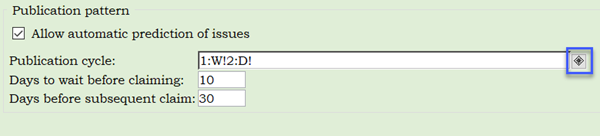
- Select daily, weekly, monthly, or annually, based on the frequency of the publication.
- Enter other information, such as the date of the week the serial is published, to complete the publication pattern.
- You may use the Omit Issues Helper to omit specific issues as exceptions to the pattern.
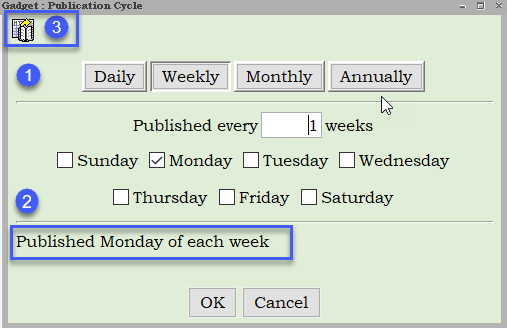
- Click OK.
Enumeration & chronology and the OPAC display tab
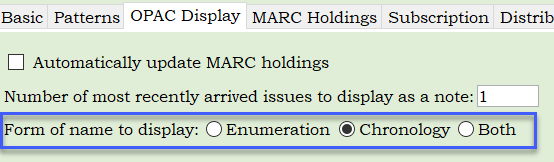
- Once you have built your pattern, click on the OPAC Display tab.
- Under Form of name to display, you have three options. Select the radio button that matches the serial pattern.
- For example, for a consumer magazine where you are recording chronology only, choose the Chronology radio button. If you select the both radio button, the chronology will list twice in the serial call number.
If your library does not generate predictions and prefers to enter enumeration and chronology information for issues on-the-fly, staff must enter a value for both enumeration and chronology, even though "Chronology" only may be selected.