Main Content

Purchase Suggestions

Your library can choose to use the Aspen purchase suggestion system, link to your own webform, or opt out of any purchase suggestions in your catalog. 

If you use the Aspen purchase suggestion system, patrons submit purchase suggestions and track the status of requests in the Aspen catalog. Authorized staff manage requests in Purchase Suggestions through Aspen, updating the status of a request to the next step in the review process, including referral to collection development for purchase or lending via interlibrary loan.

We strongly recommend setting up an Aspen consultation if you are setting up the Aspen purchase suggestion system for the first time.

If you set up your own form, patrons will simply see a link to Suggest a purchase at the bottom of every search results page, which will direct them to your website.

Using the Aspen purchase suggestion system

Submit a request

Patrons can submit a purchase or materials request when logged into their library account. Either:

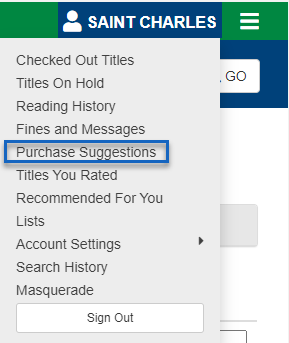
  • Select Purchase Suggestions from the dropdown list of account functions 
    purchase suggestion in the account menu.
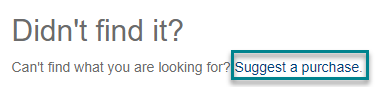
  • Conduct a search for the title requested, scroll through search results. If the desired title is not found, Suggest a purchase is available at the bottom on search results. 
    Suggest a purchase under search results 
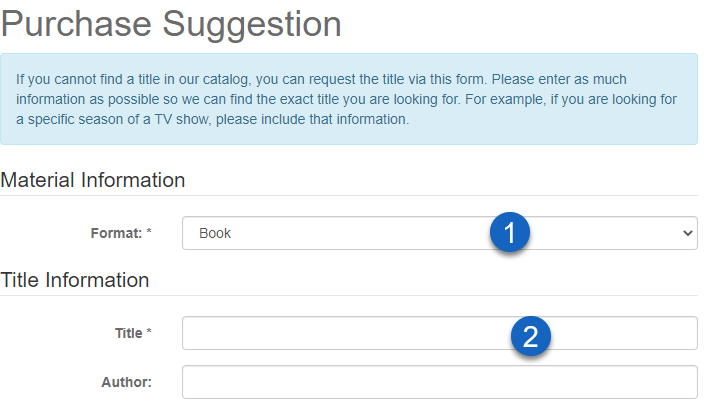
    In this case, the search string is automatically populated as the title in the Purchase Suggestions form.

Purchase Suggestions form

The form reminds patrons to search the catalog before requesting a title. Form fields include:

  1. Material Information
    • Format (required) - depending on format, additional information may be requested (e.g. season)
  2. Title Information
    • Title (required)
    • Author 
      purchase suggestion form
  3. Hold Options
  4. Supplemental Details
  5. Contact Information

You may have additional fields depending on your library's configuration.

Patrons limits

Default limits allow patrons to place 60 requests in a year, with no more than 5 open at one time. Your library may have set different limits under Library Systems > Purchase Suggestions. If a patron submits a request when limits have been reached, they will receive an error message. 

Monitoring requests

Under My Account, patrons can review and track their requests, both open and closed.

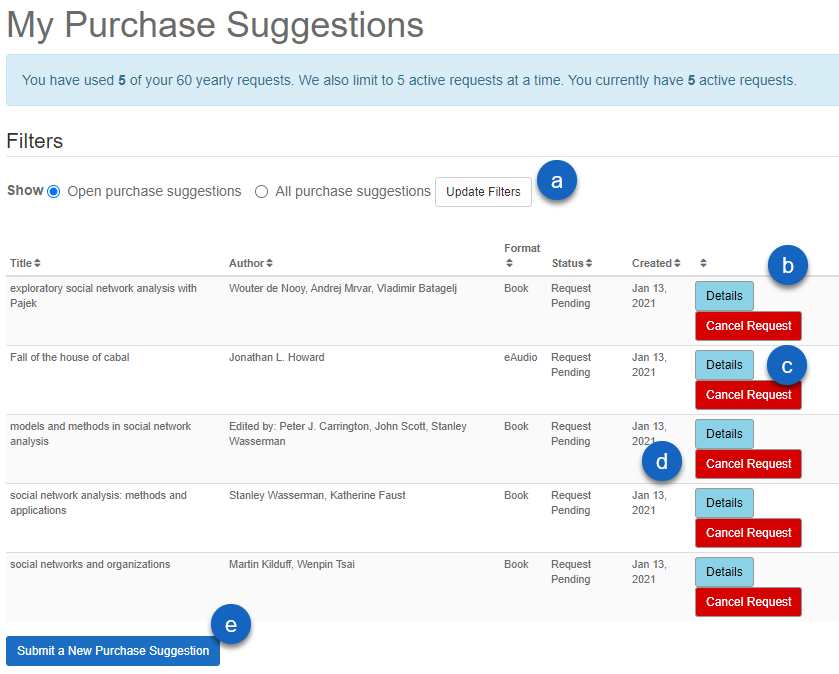
Patrons can list My Purchase Suggestions to:

  1. Show open requests or all requests with Update Filters
  2. Sort by title, author, format, status, or creation date
  3. View Details selected to review the request
  4. Cancel Request if no longer desired
  5. Submit a New Purchase Suggestion

purchase suggestions listed in the patron interface

Managing Purchase Suggestions

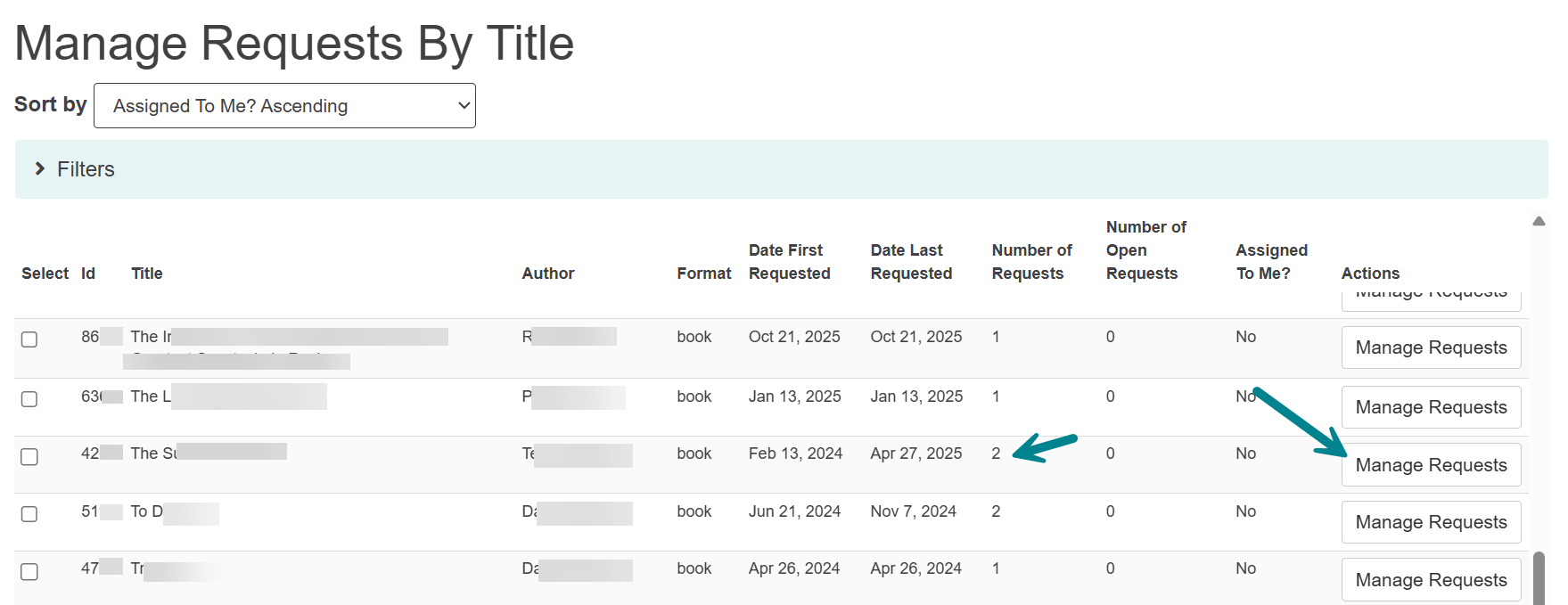
Once patrons submit purchase suggestions, staff can manage and track requests through Aspen Administration. As staff change the request statuses, patrons can view those in their account. Staff can also place holds for patrons through the purchase request system on titles already in the catalog or items that have been purchased.

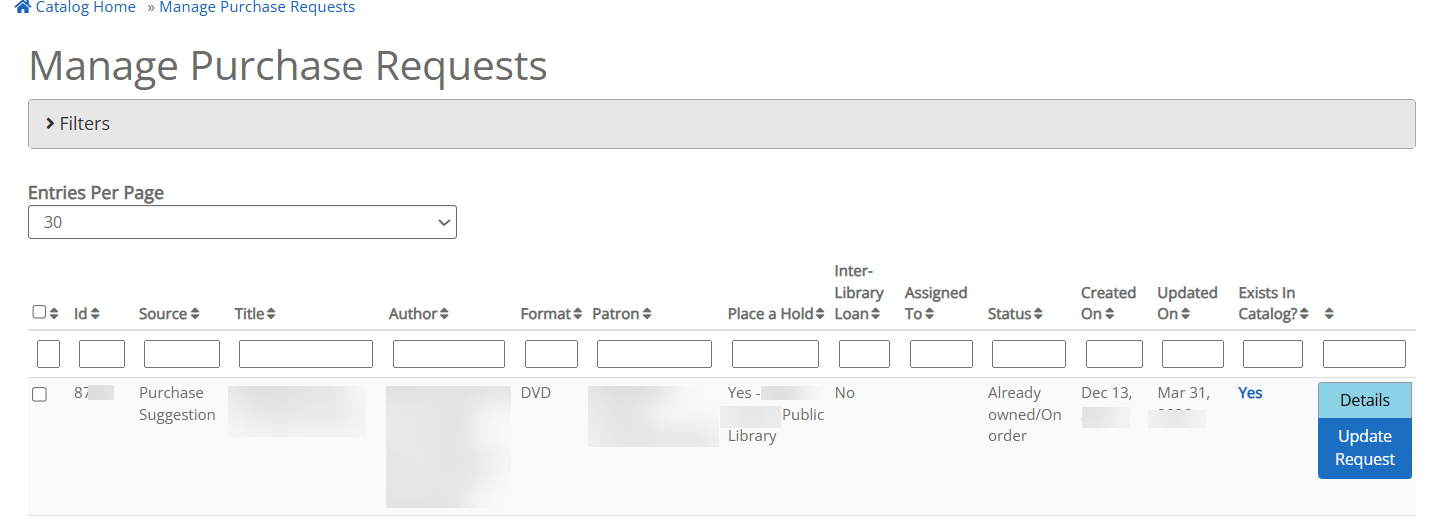
Go to Aspen Administration > Purchase Suggestions > Manage Requests to view all purchase suggestions.

  • On any request, click the Details button to see full form submitted by the user. 
  • Click Update Request to change the status. 
    • You can edit any of the details, such as mistyped Titles, Authors, etc.
    • Adding an ISBN or UPC can help Aspen locate a record for the holds processing steps
    • To update the Status, you can choose from the dropdown - SWAN has the following statuses configured by default, but your library may have a custom configuration
      • Request Pending (default - when a patron submits a new request)
      • ILL Under Review
      • Not enough info - please contact Collection Development to clarify
      • Referred to Collection Development
      • Already owned/On Order
      • Cancelled by Patron
      • Cancelled by Staff
      • Item Purchased
      • Request Filled by ILL
      • Unable to acquire the item
      • Hold Placed (also applied as an automated status)
      • Hold Not Needed (also applied as an automated status)
      • Hold Failed (also applied as an automated status)
  • You'll also be able to export requests to a spreadsheet from the Manage Requests screen. 
  • If your library has Check Requests for Existing Titles in the Catalog on, you'll also see the Exists in Catalog? column and a "yes" or "no" to help you manage requests
Image:
manage interface for materials requests in Aspen

Filter by status

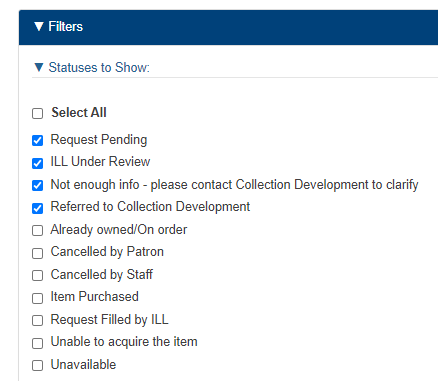
Statuses to show, by default, are those considered open. Expanding Filters > Statuses to Show includes these as checked/default statuses to display in the Manage Requests listing. The filters you see will depend on your library's configuration.

Sometimes you may need to expand Assigned To and select both Unassigned and Select All for filters to apply.
staff filter options to show statuses

The Usage Dashboard under Aspen Administration > Purchase Suggestions > Usage Dashboard shows statistics for requests submitted and the statuses applied (Canceled by Patron, Item Purchased, etc.)

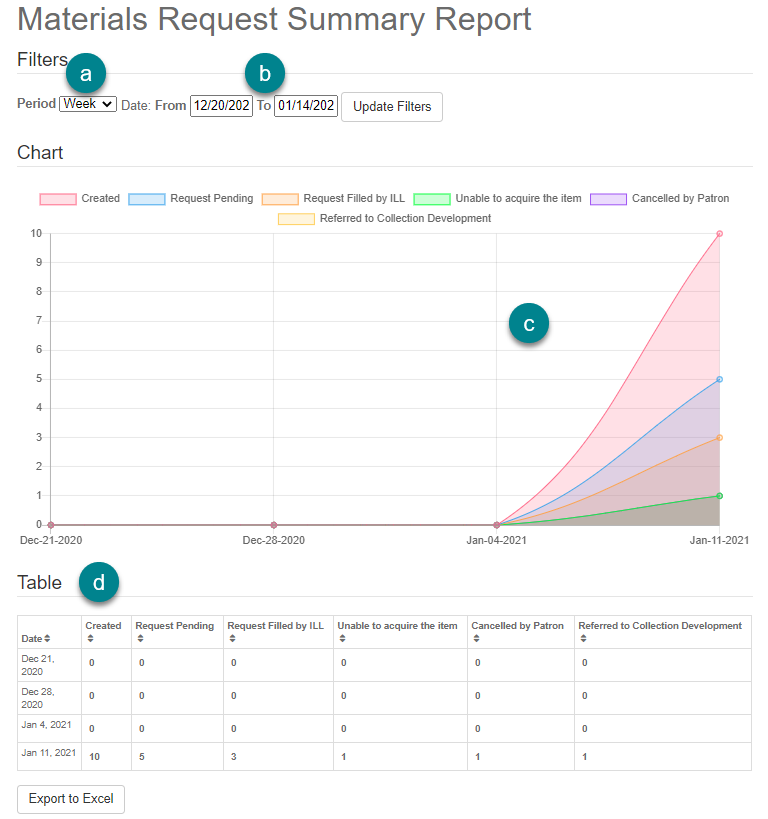
You can view usage data visualizations under Aspen Administration > Purchase Suggestions > Summary Report 
Summary Report

  1. Filter by time period.
  2. Filter by date range.
  3. Chart displays requests by current status.
  4. Table displays count by date and status for daily statistics.
  5. Export to Excel.
     

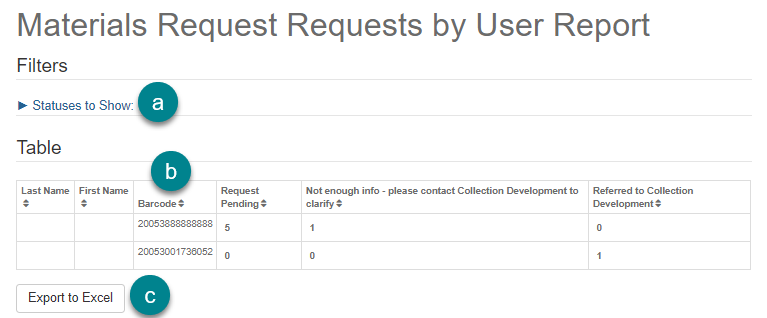
Aspen Administration > Purchase Suggestions > Report by User  can help you identify patrons submitting multiple requests.

  1. Filter by status to display, by default open statuses are checked.
  2. Sort by barcode or other fields, if desired
  3. Export to Excel.


Report by User

Update the request

  1. Follow the steps for Managing Requests to update the request
  2. Change the status to Item Purchased or Already Owned/On Order
    • Note: These statuses will check for holds by default, but your library may have custom statuses
  3. Add ISBN or UPC to the request if needed
  4. Check if the patron has the Place hold when available? option checked
  5. Update Request

Check for holds

At 9AM each day, Aspen will check for holds on materials requests with the statuses of Item Purchased and Already Owned/On Order.

You can run this check manually:

  • Go to Aspen Admin > Materials Requests > Requests Needing Holds
  • Select the Check for New Hold Candidates button at the bottom of the page.

If a request matches more than one item in the catalog, you will have the option to choose which record on which to place the hold by clicking the Select Hold Candidate button next to the request. 

  • Choose which record is the best match by selecting its radio button and clicking the Use Selected button.
  • You should see a success message and the record information in the Selected Hold Candidate column for that request. 
  • Click on the Select Hold Candidate button again if the incorrect record was selected, otherwise use the Place Hold button to initiate the hold.

If holds fail, they will remain in the Requests Needing Holds list to allow for the hold to be retried.

Troubleshooting

For this feature to work, you must have the following configured:

  • Place hold when available field in the request form
  • Format mapping configuration
  • Materials request statuses for Hold Placed, Hold Failed, and Hold Not Needed

Setting up a link to your own form

You will need OPAC Administrator permissions. 

  1.  Go to Aspen Administration > Primary Configuration > Library Systems > Edit > scroll down to Purchase Suggestions.
  2. Select External Request Link
  3. Select Enable Materials Request for the Public 
  4. Add the URL to your website form under External Materials Request URL
  5. Save

You'll now see a button to Suggest a purchase at the bottom of every search results page. 

Setting up Aspen Purchase Suggestions

You will need OPAC Administrator permissions. We strongly recommend setting up an Aspen consultation if you are setting up the Aspen purchase suggestion system for the first time.

Purchase suggestions in Aspen consists of several parts:

  1. Patron settings and request form, configured in Library Systems settings
  2. Statuses that shape your staff workflows for managing requests
  3. Format mapping that supports automated hold features

Set up the form in Aspen Administration > Primary Configuration > Library Systems > Edit > scroll down to Purchase Suggestions.

From here, set the following:

  1. Select Aspen Request System
  2. When you are ready to go live, you will check Turn on Materials Requests for the Public -- we suggest leaving this off while you set up and test
  3. Choose if Aspen should Send email to library when Materials Requests are created
    1. Enter Email to receive notifications for new Materials Requests
  4. Choose if Aspen should Send an email to staff when they are assigned a Materials Request
  5. Choose Max Requests Per Year per user (i.e. "how many requests can a user submit within a year?")
  6. Choose Yearly Request Limit Type
    1. Rolling Year means that the yearly request limit is ongoing and it looks at the previous 12 months to determine if an individual patron has met the limit.
    2. Calendar Year means that all requests reset on January first.

      Example: A library’s max requests per year is 12 and their max open requests is 6 with a Calendar Year Request Limit Type. If there is a patron who, on December 31, 2024, has made 12 requests, 4 of which are open. On January 1st, 2025, that patron will have the the ability to add 12 more requests between January 1st and December 31st, 2025, but can only add 2 on January 1st due to already having 4 open.

  7. Choose Yearly Request Calendar Start Date
    1. Select applicable month and day (default value is January 1)
  8. Choose the Max Active Requests at once per user
  9. Add any messaging around your materials request policies and processes in New Request Summary
  10. Decide if you want materials requests to be automatically deleted after a certain amount of days in Delete Closed Requests Older than (days)
    1. Note: Aspen will retain materials requests for a minimum period of 366 days (1 year + 1 day). This is so that the Max Requests Per Year can be accurately reflected. If you leave 0 here, then materials requests will not be deleted. You must put a time frame higher than 366 if you want a custom time frame.
  11. Decide if you want Aspen to Check Request for Existing Titles in the Catalog (recommended to leave this on)
    1. When managing requests this will show you if a request is in the catalog or newly added
    2. Patrons will see a warning when they enter a request that their title is already in the catalog before they submit
  12. Save -- there is more to set up, but we recommend saving before moving onto the next steps to add your Purchase Suggestion form fields.

In this section, you will add broad format categories. These will help staff, and Aspen's automated tools to check for holds and titles already in the catalog. 

Important! If you already have Aspen purchase suggestions already set up, do not use the Set Materials Request Formats To Default as it can cause issues with your existing requests.

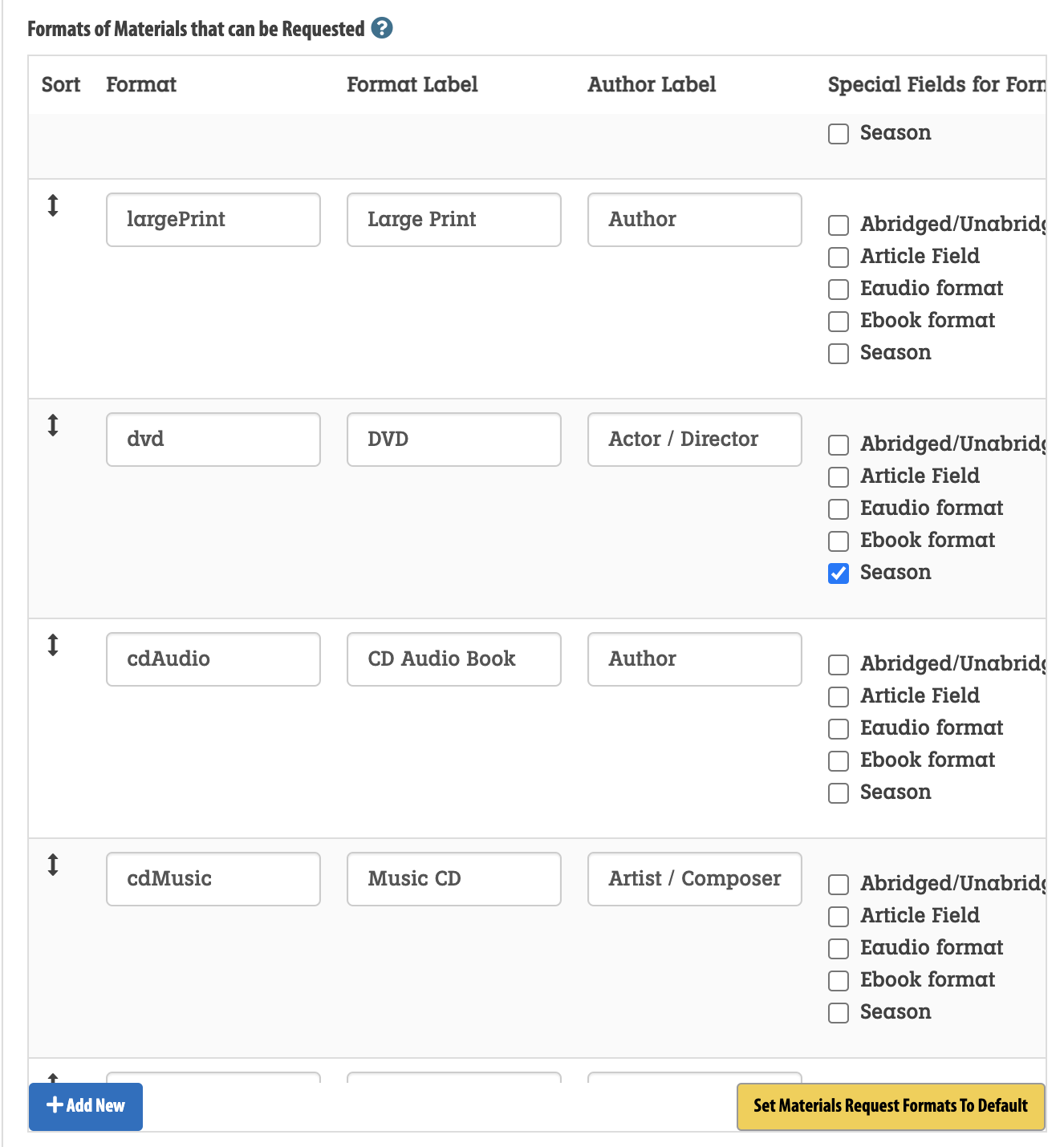
  1. In Library Systems > Purchase Suggestions > Formats of Materials that can be Requested click Set Materials Request Formats To Default to automatically load default formats.

    Image:
    materials request configuration in Aspen administration
  2. From here, remove any formats you don't want users to be able to select when submitting requests. 
  3. You can also click Add New and manually type in your Format, Format Label, Author Label, and select any Special Fields that should show additional options associated with that format.
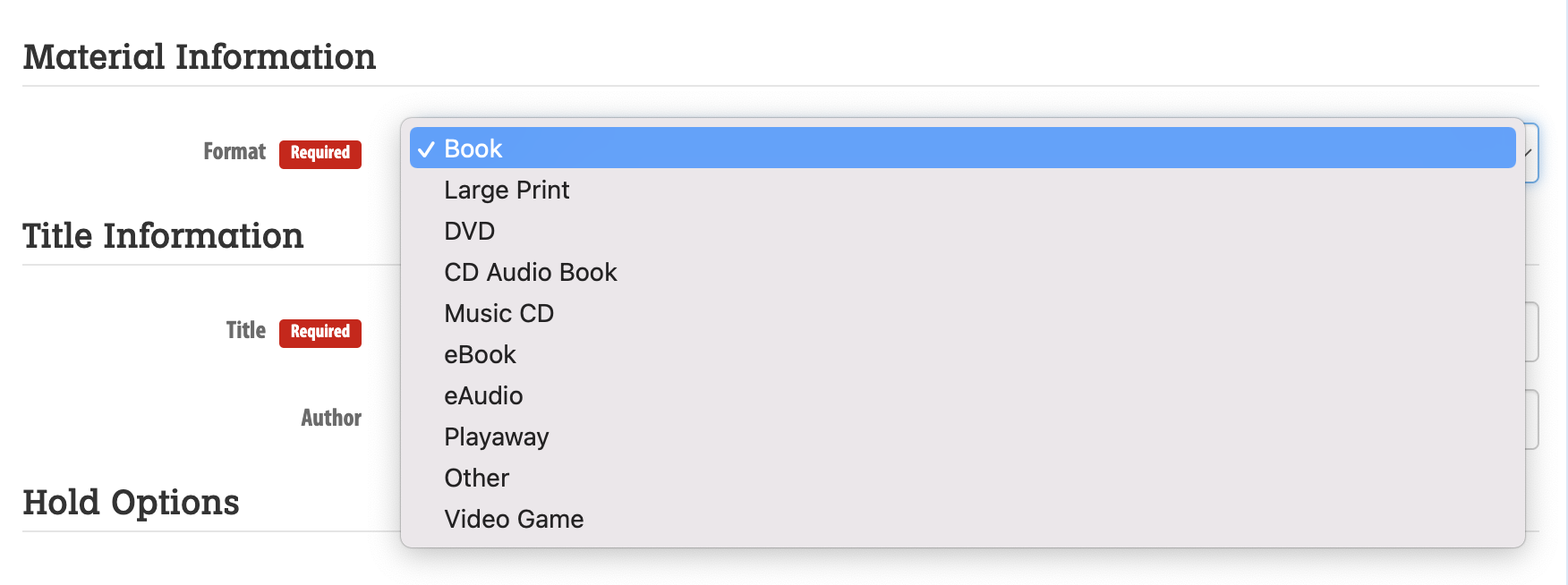
  4. Once these format fields are set, they will display as a dropdown menu on the materials request form for patrons to select.
  5. For any formats with Special Fields for Format selected, an additional field will appear after it is selected. (For example, if DVD is selected, a Season field appears).
     

    Image:
    format dropdown for aspen purchase suggestions

Note: Format is a required field for patrons submitting a request.

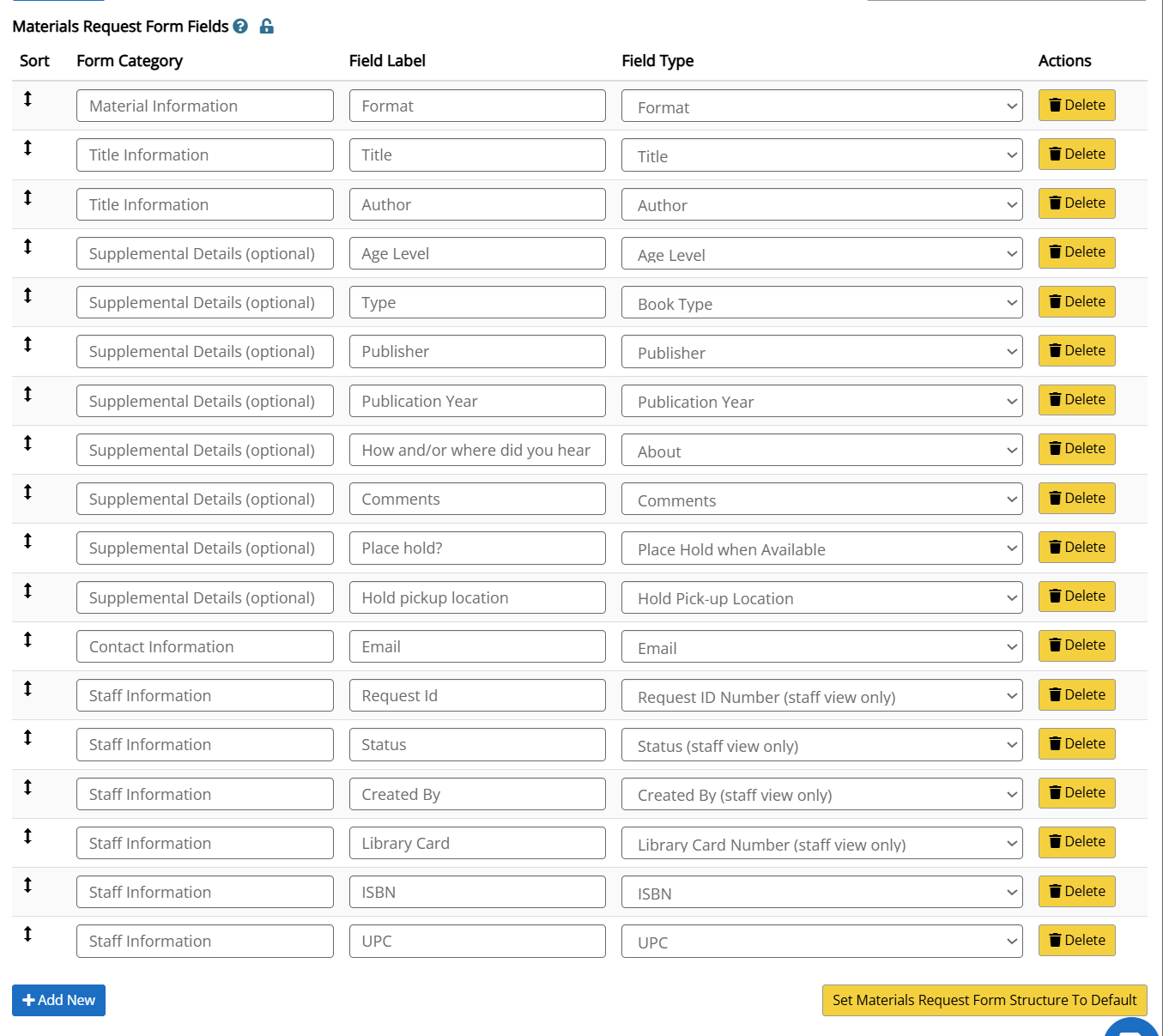
To configure the form fields that appear on the materials request form, visit Library System settings > Purchase Suggestion > Materials Request Form Fields.

Important! If you already have Aspen purchase suggestions already set up, do not use the Set Materials Request Form Structure To Default as it can cause issues with your existing requests.

Click Set Materials Request Form Structure To Default to automatically load the default form field options.

You can edit the default options

  • Form Category: Displays as a header for sections of your form - fields with the same Form Category will group together.
  • Field Label: i.e. Format, Publication year, etc.
  • Field Type will set what information the patron enters, and will pull some data from Aspen.
    • For example, for Age Level Aspen will pull in Adult, Teen, Children, and Don't Know as select options.
    • Only Format and Title are required.

Some fields are required for Aspen to check for holds and existing records in the catalog, including:

  • Email 
  • Place hold when available

Click Add New to add additional form fields, where you'll be able to enter in the Form Category, Field Label, and select the Field Type.

Click Delete to remove any fields.

Tip: Too many form fields can overwhelm patrons, and you may actually get less information about the request the more fields you use. Limit the number of fields you add to those absolutely necessary.

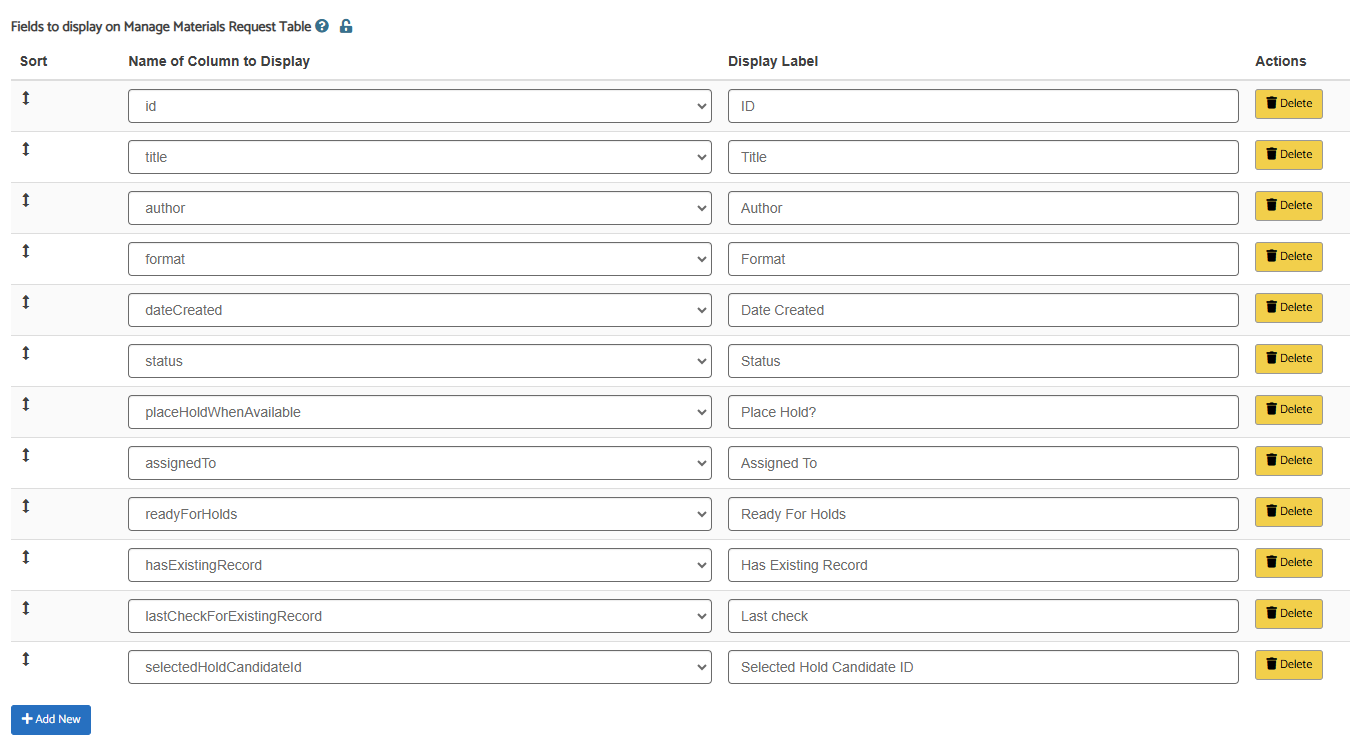
In Library Systems > Purchase Suggestion > Fields to display on Manage Materials Request Table, you can optionally customize what fields will display in the table view to library staff managing requests (in Aspen Administration > Purchase Suggestions > Manage Requests).

If you don't configure anything, the defaults will display.

Image:
Configuration table to customize the fields that appear to staff managing materials requests


Library staff will use Purchase Suggestion Statuses to move requests from the initial patron form submission through fulfillment or cancelation. 

Go to Aspen Administration > Purchase Suggestions > Manage Statuses to add and customize statuses.

Note: You will need OPAC Administrator permissions.

  1. Click the Reset to Default button to load a number of out-of-the-box statuses you can choose from as a starting point. 
  2. Select Edit to change or delete any statuses you do not wish to use.
    1. You must have at one status set as Default Status -- usually Request Pending
    2. It's recommended to have one status to Set When Patron Cancels -- usually Cancelled by Patron)
    3. Open statuses indicates the request is in process by library staff, and counts toward the Max Open Requests set in Library Systems.
    4. Active requests count towards the patrons total number of active requests.
    5. Check for holds: Any requests with this status will be checked to see if the title is in Aspen so a hold can be placed for it -- usually Already owned/on order and Item purchased
    6. Hold Placed Succesfully? When a hold is placed successfully the request will automatically be move to this status (only one status can have this checked)
    7. Hold Not Needed? When a hold is not needed (the patron did not request a hold when submitting the form) the request can be moved to this status (only one status can have this checked). Recommended that this is a closed status.
    8. Hold Failed? When a hold cannot be placed, the request will be moved to this status automatically (only one status can have this checked).
    9. Send Email To Patron will trigger an email to be sent to the patron when this status is selected. 
      1. Add text to the Email Template field (see more below on email templates)
      2. If you have multiple statuses with this set, patrons will receive emails each time you change the status.

Format mapping allows Aspen to check for holds candiates amongst your requests.

To load formats, or add newly added formats, go to Aspen Administration> Purchase Suggestions> Format Mapping and select the Update Active Formats button.

You will see all formats in the Aspen catalog. Multiple formats can be mapped to your request formats, set in your Library Systems settings. For example, 4k Blu-ray, Blu-ray, and Blu-ray/DVD combo can all be mapped to a "Blu-ray" format request option from your form.

Note: If you see formats with a plus sign, such as "Book + DVD" that indicates the first format is the primary format and the second format is supplementary. In this example, Book + DVD means this is a book that also has a supplemental DVD.

Tip: Think like a patron -- you might think a Playaway should be mapped as Book, but a patron might be surprised to have their request for a book fulfilled by a Playaway.

To edit your format mapping:

  • Click the Edit button to map individual formats
  • Use Batch Update Selected to select several to update at once


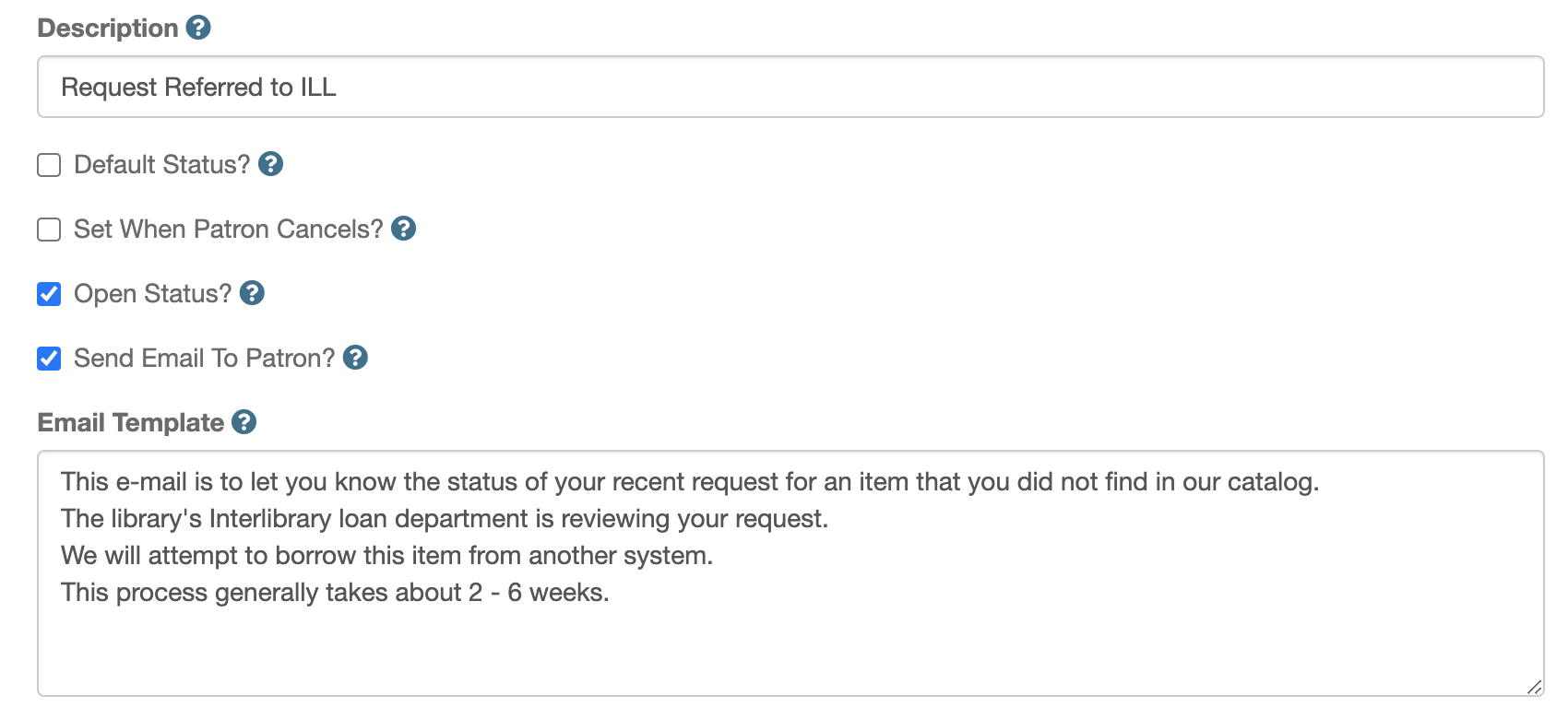
Emails to patrons to update the status of their request are configured in  Aspen Administration > Purchase Suggestions > Manage Statuses. Be sure the box "Send email to patron" is checked.

Image:
aspen administration interface to edit email templates for patrons

You can add generic, plain text to your email templates. Or, you can use the email tokens below to dynamically add information about the request to the email.

These settings are the same across all libraries, and cannot be edited:

Tip: you may want to add your library name, contact information, website and/or catalog link as these are not automatically included.

Email Tokens

You can add email tokens to dynamically include information about the request in the email to your patron. 

Example:

Hello {firstname}! Your suggestion of {title} will be purchased by our library and placed on hold for you.

The tokens available for use in email forms are:

  • firstname
  • lastname
  • email
  • phone
  • cat_username (this is patron cardnumber)
  • title
  • season
  • magazineTItle
  • magazineDate
  • magazineVolume
  • magazineTitle
  • magazineDate
  • magazineVolume
  • magazineNumber
  • magazinePageNumbers
  • author
  • format
  • formatId
  • subFormat
  • ageLevel
  • bookType
  • isbn
  • upc
  • issn
  • oclcNumber
  • publisher
  • publicationYear
  • abridged
  • about
  • comments
  • status
  • phone
  • email

Example:

Hello Sally! Your suggestion of 'Harry Potter and the Halfblood Prince' will be purchased by our library and placed on hold for you on arrival.
Tokens Used:

Hello {firstname}! Your suggestion of {title} will be purchased by our library and placed on hold for you on arrival.