Outreach module standards and best practices
For data consistency, Outreach patrons and the staff who utilize the module should adhere to the following standards.
Patron information
For a new patron or existing patron that is requiring Outreach services, follow these standards for their patron records:
- All Outreach patrons must have the patron’s real name in the first and last name fields in the record.
- Enter the business as you normally would.
- All patrons must have a profile of OUTREACH.
- Library Defined should be set to NO_UNIQUE.
- Hold Pickup Preference should be OUTREACH if you want this to print on your hold wrappers.
- Birth date is a required field.
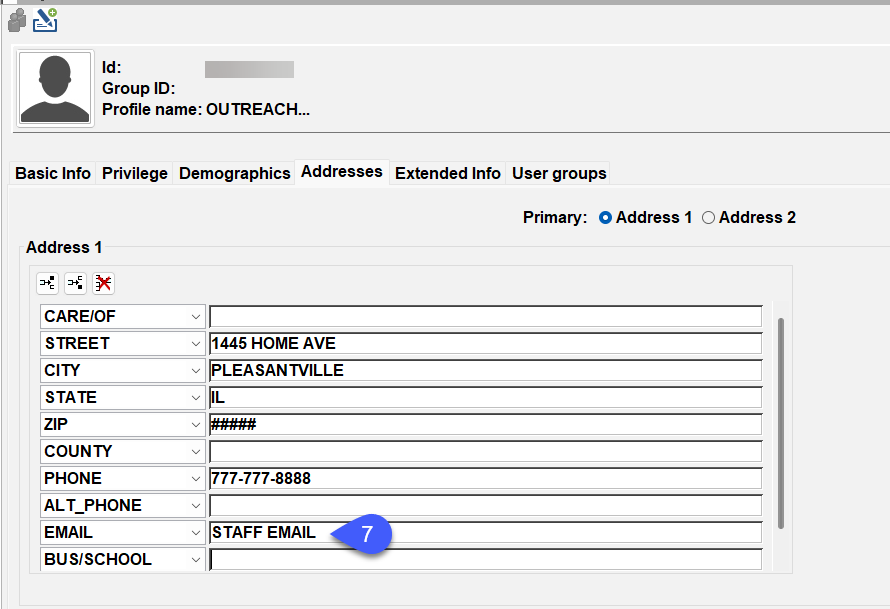
- To ensure that patrons do not receive any hold or bill notices, a staff member, or generic department email should be in the patron’s record.
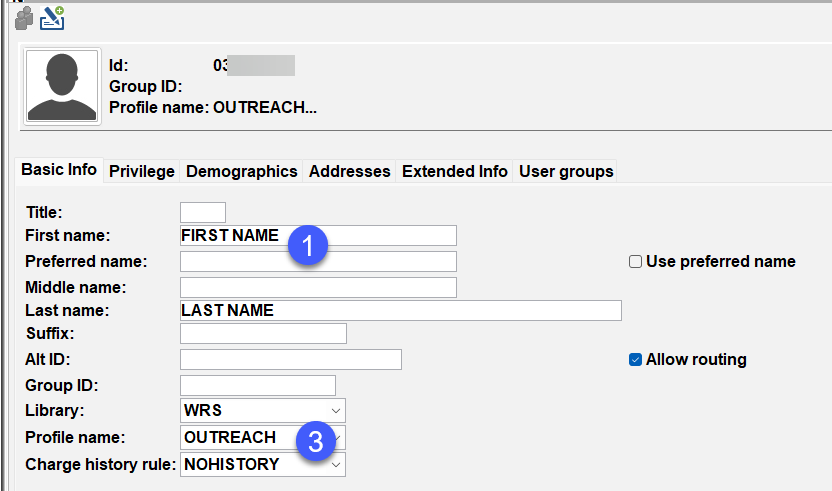
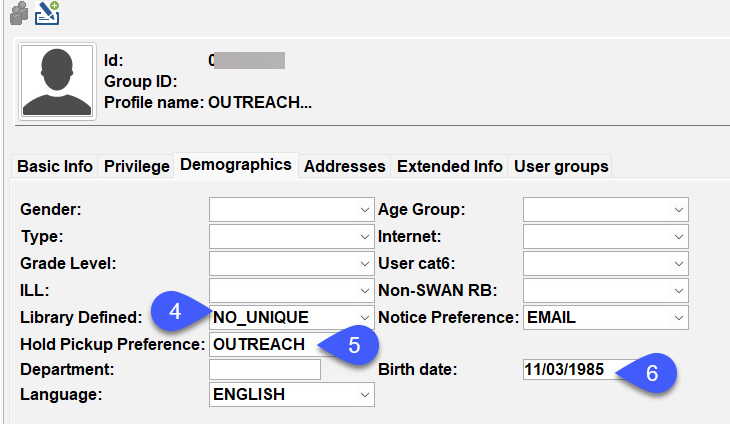
Example of the address tab in a patron record. If you are delivering to a facility, enter the facility's information.
Circulation rules
The libraries that use the outreach module will have the following circulation rule for ALL item types.
- 8 weeks, 0 fines, 0 grace, 0 renewals (8W0F0G0R)
Routes
All route names need to begin with the library’s 3 letter agency code.
Examples:
- SWS_PINEHOMES
- SWS_ROUTE1
Lost & damaged items
All ILL items will follow the Quarterly Billing structure, it is up to the library if they want to charge their patron, however, the library will be charged for the item.
Best practices
Patrons can be moved in and out of the Outreach module at the library's discretion. To avoid losing the patron’s existing outreach history, leave their record in the outreach module and change their user profile. Outreach history will continue to record after you have changed the user profile from OUTREACH to your local patron profile name.
Privilege expiration will default to NEVER, however you can shorten it to fit your local library policy.
If your patron visits other libraries, you should change the user profile from OUTREACH to your standard profile. If you do not do so, the checkout library can change the due date and items will not be renewed.
Search interests best practices and tips
If you would like to only select titles that your library owns when searching interests, right-click on the Search Interest wizard select properties, and select your library from the drop-down menu.
Be familiar with your library's genres and subject headings.
Keep interests as simple as possible, not exceeding two subject terms. Ex: Name: Action/Adventure, Search String: ((Action) AND (Adventure) Fiction)
The item requested number can be changed per interest. A simple rule of thumb is to have a higher number when you are creating a subject search and a lower one for author searches.
Keep rank at one.
Removing users from outreach
If a patron will not require outreach services ever again and you need to remove them from the module, follow these steps carefully.
- Open the Outreach Module.
- Open Remove History Wizard. Find the user, select all items, and press the Remove History button.
- Open Remove Interest Wizard. Find the user, select all interests, and Press the Remove Interest Button
- Open the Modify User Wizard. Under the Basic Info tab, change the profile from OUTREACH to the appropriate library profile. Go into the Outreach tab and uncheck the Active Status box.
- Open the Remove Outreach User Wizard, find the user, and select the Remove Outreach Information button.
If the patron stops outreach services temporarily, open the Modify User Wizard and change the user's profile from OUTREACH to the appropriate library profile.
SirsiDynix outreach training guide
SirsiDynix Outreach Training Guide is an excellent resource that gives instructions on how to use the Outreach Module.